
PS:因为插入了很长的代码片段这篇文章并不是很方便阅读😄
因为我是代码小白在实际使用中遇到了很多问题感谢两位大佬提供帮助
为文章和瞬间的图片添加灯箱
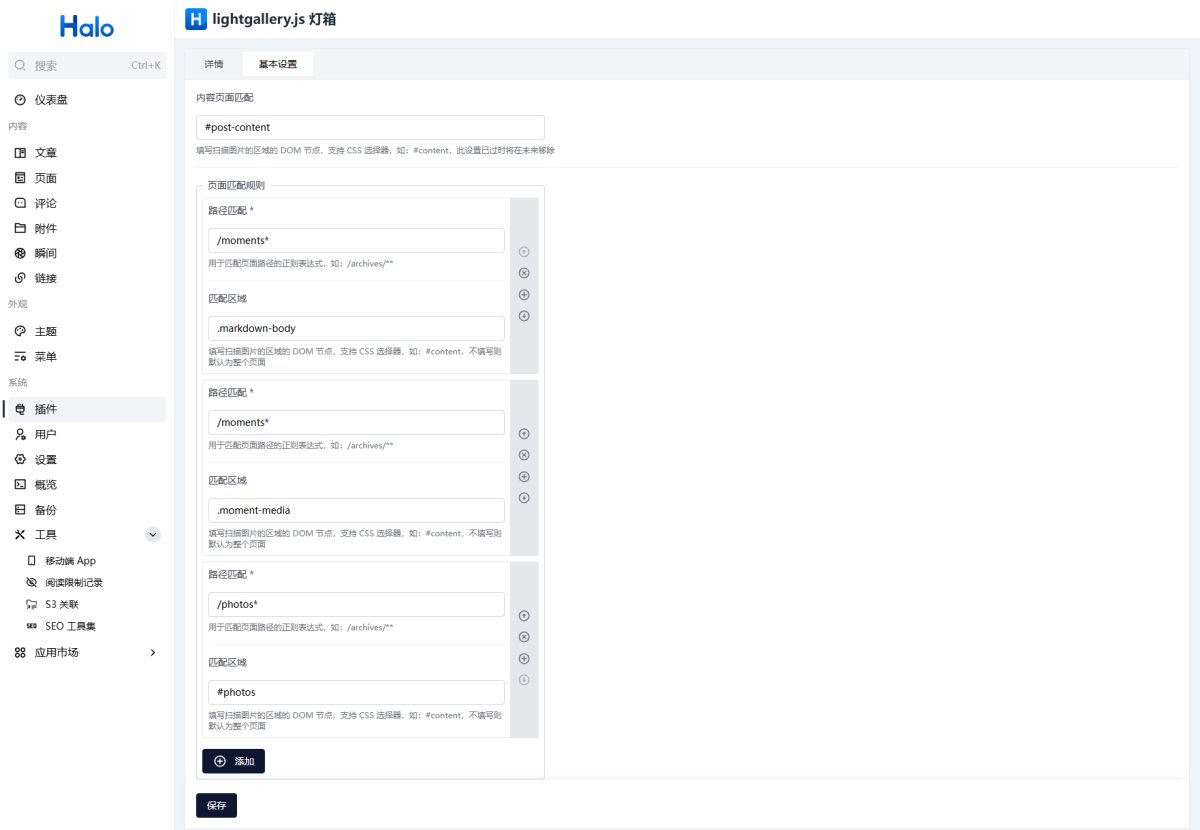
安装 lightgallery.js 灯箱 插件的最新版本,然后进入插件设置,在 内容页面匹配 中填写 #post-content 就可以为文章页添加灯箱了瞬间页需要按照下述表格配置。
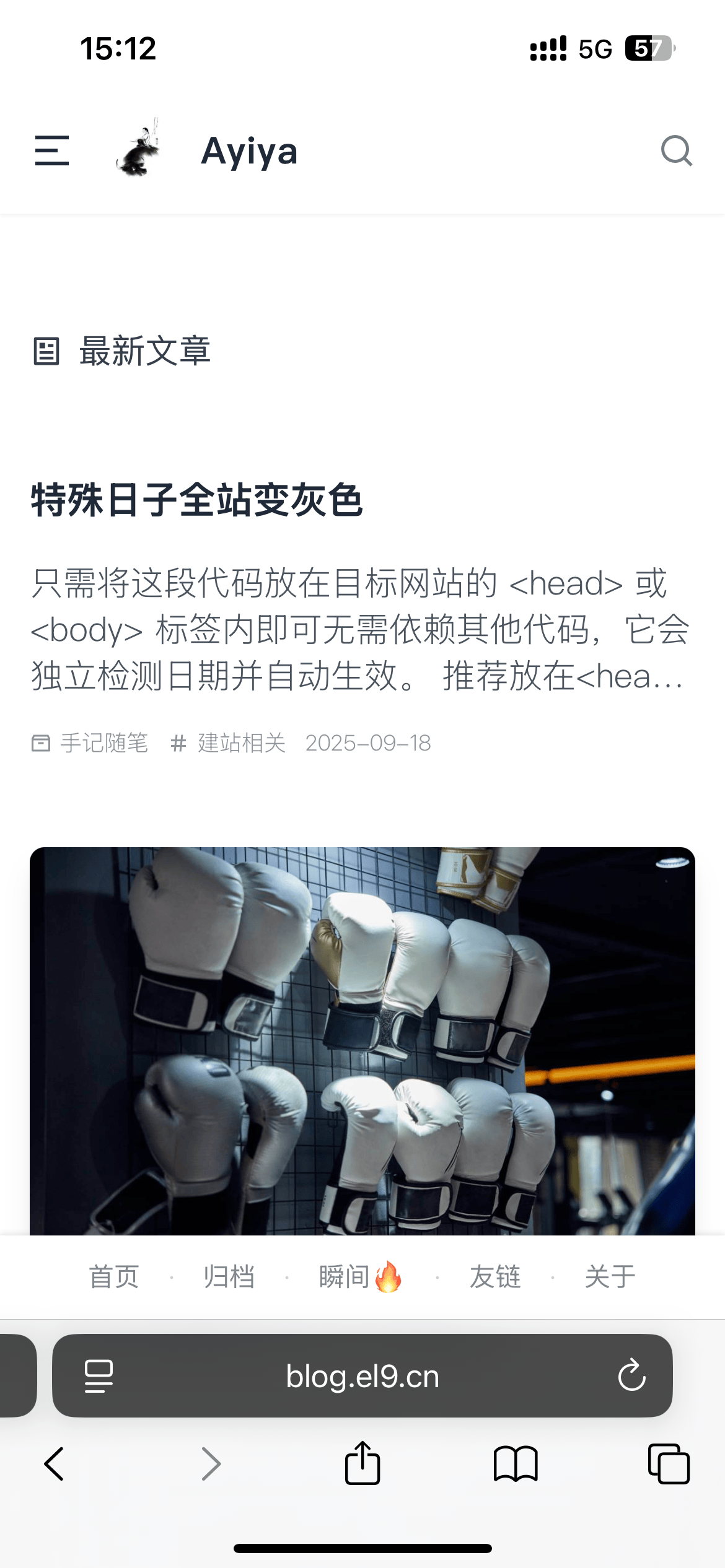
为手机端底部添加吸底菜单
可在 Halo后台→设置→代码注入→页脚 中添加下述代码
<!-- 手机端吸底菜单 -->

<style>
.footer-nav {
    /* 默认隐藏,仅在手机端显示 */
    display: none;
    align-items: center;
    justify-content: center;
    gap: 8px;
    font-size: 14px;
    line-height: 1.5;
    color: inherit;
    margin: 0;
    padding: 12px 0;
    /* 固定在底部 */
    position: fixed;
    bottom: 0;
    left: 0;
    right: 0;
    /* 添加背景以覆盖内容 */
    background: #fff;
    box-shadow: 0 -1px 3px rgba(0,0,0,0.1);
    z-index: 1000; /* 确保在其他内容之上 */
}

.footer-nav .nav-separator {
    color: inherit;
    opacity: 0.3;
    margin: 0 8px;
    font-weight: 300;
    font-size: 12px;
}

.footer-nav a {
    color: inherit;
    text-decoration: none;
    transition: all 0.2s ease;
    opacity: 0.8;
    position: relative;
    padding: 4px 6px;
}

.footer-nav a:hover {
    opacity: 1;
}

.footer-nav a::after {
    content: '';
    position: absolute;
    width: 0;
    height: 1px;
    bottom: 0;
    left: 50%;
    background: currentColor;
    transition: all 0.2s ease;
    transform: translateX(-50%);
}

.footer-nav a:hover::after {
    width: 100%;
}

/* 返回顶部按钮位置调整 */
    #btn-scroll-to-top{
      bottom:3rem;
    }

/* 响应式设计 - 仅在手机端显示 */
@media (max-width: 768px) {
    .footer-nav {
        display: flex;
        flex-wrap: wrap;
    }
}
</style>

<div class="footer-nav">
    <!-- 动态导航链接 -->
    <span class="nav-links"></span>
</div>

<script>
document.addEventListener('DOMContentLoaded', function() {

    // 导航链接配置
    const links = {
        '首页': 'https://blog.el9.cn',
        '归档': '/archives',
        '瞬间🔥': '/moments',
        '友链': '/links',
        '关于': '/about'
    };

    // 动态生成导航链接
    function generateNavLinks() {
            const navLinksContainer = document.querySelector('.nav-links');
            if (!navLinksContainer) return;

            const linkElements = Object.entries(links).map(([text, url], index) => {
                const link = document.createElement('a');
                link.href = url;
                link.textContent = text;
                link.target = url.startsWith('http') ? '_blank' : '_self';

                // 如果不是最后一个链接,添加分隔符
                if (index < Object.entries(links).length - 1) {
                    const separator = document.createElement('span');
                    separator.className = 'nav-separator';
                    separator.textContent = '·';  // 使用中点符号
                    return [link, separator];
                }

                return [link];
            }).flat();

            // 清空容器并添加新链接
            navLinksContainer.innerHTML = '';
            linkElements.forEach(element => {
                navLinksContainer.appendChild(element);
            });
        }

    // 初始化导航链接
    generateNavLinks();
});
</script>
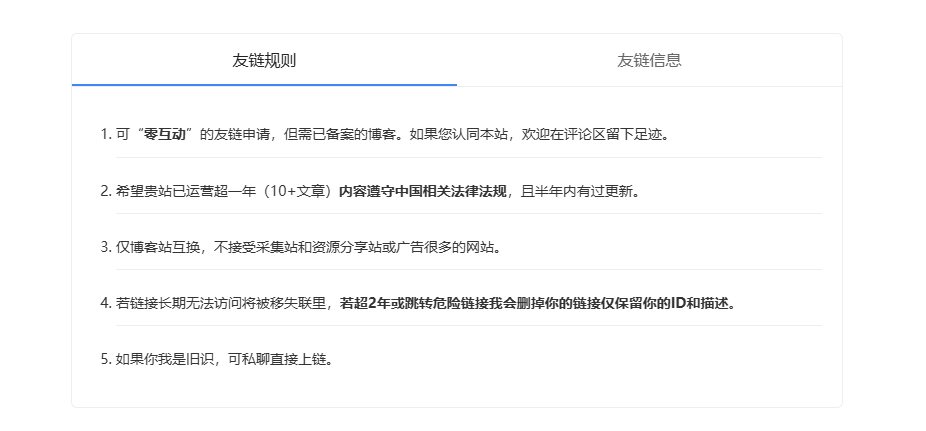
为友链页添加规则
可在 Halo后台→主题设置→插件适配→页面底部内容中添加下述代码
设置了屏幕宽度低于768PX不展示,可通过修改max-width后面的数值来自行调整
<!DOCTYPE html>
<html lang="zh-CN">
<head>
  <meta charset="UTF-8">
  <meta name="viewport" content="width=device-width, initial-scale=1.0">
  <style>
    /* 基础样式 */
    body {
      font-family: "Microsoft Yahei", sans-serif;
      line-height: 1.6;
    }

    /* 整体容器 */
    .tab-wrapper {
      max-width: 800px;
      margin: 20px;
    }

    /* 标签页容器 */
    .tab-container {
      border: 1px solid #eee;
      border-radius: 6px;
      overflow: hidden;
    }

    /* 标签头(按钮容器) */
    .tab-header {
      display: flex;
      border-bottom: 1px solid #eee;
    }

    /* 标签按钮 */
    .tab-btn {
      padding: 12px 20px;
      border: none;
      background: transparent;
      cursor: pointer;
      flex: 1;
      text-align: center;
      font-size: 16px;
      font-weight: 500;
      color: #666;
      transition: all 0.2s;
      position: relative;
    }

    /* 激活状态标签(底部蓝色下划线) */
    .tab-btn.active {
      color: #222;
    }

    .tab-btn.active::after {
      content: '';
      position: absolute;
      bottom: 0;
      left: 0;
      width: 100%;
      height: 2px;
      background-color: #4285f4;
    }

    /* 标签内容区域:固定高度 + 溢出隐藏 + 盒模型调整 */
    .tab-content {
      padding: 20px;
      height: 320px; /* 固定高度,确保两个面板一致 */
      box-sizing: border-box; /* 内边距不影响总高度 */
      overflow: hidden; /* 防止内容溢出 */
    }

    /* 标签面板:继承父容器高度 */
    .tab-panel {
      display: none;
      height: 100%; /* 与父容器高度一致 */
    }

    .tab-panel.active {
      display: block;
    }

    /* 站点信息列表:flex布局均匀分布条目 */
    .site-info {
      list-style: none;
      padding: 0;
      margin: 0;
      height: 100%;
      display: flex;
      flex-direction: column;
      justify-content: space-around; /* 垂直均匀分布条目 */
    }

    .site-info li {
      display: flex;
      align-items: center;
      padding: 6px 0; /* 行间距缩小:从10px改为6px(可按需调整) */
      border-bottom: 1px solid #eee;
    }

    .site-info li:last-child {
      border-bottom: none;
    }

    /* 站点信息-标签 */
    .site-info .label {
      width: 80px;
      font-size: 14px;
      color: #666;
      margin-right: 20px;
      text-align: right;
    }

    /* 站点信息-内容文本 */
    .site-info .value {
      flex: 1;
      font-size: 14px;
      color: #333;
    }

    /* 友链规则列表:flex布局均匀分布条目 */
    .link-rules {
      list-style: decimal;
      padding-left: 24px;
      margin: 0;
      height: 100%;
      display: flex;
      flex-direction: column;
      justify-content: space-around; /* 垂直均匀分布条目 */
    }

    /* 友链规则-列表项内容 */
    .link-rules li {
      padding: 10px 0;
      border-bottom: 1px solid #eee;
      font-size: 14px;
      color: #333;
    }

    .link-rules li:last-child {
      border-bottom: none;
    }

    /* 手机端隐藏标签页 */
    @media (max-width: 768px) {
      .tab-wrapper {
        display: none; /* 在手机屏幕下隐藏整个标签页组件 */
      }
    }
  </style>
</head>
<body>
  <div class="tab-wrapper">
    <div class="tab-container">
      <!-- 标签切换按钮 -->
      <div class="tab-header">
        <button class="tab-btn active" onclick="switchTab(0)">友链规则</button>
        <button class="tab-btn" onclick="switchTab(1)">友链信息</button>
      </div>
      <!-- 标签内容面板 -->
      <div class="tab-content">
        <div class="tab-panel active" id="panel-site">
          <ol class="link-rules">
            <li>可“<b>零互动</b>”的友链申请,但需已备案的博客。如果您认同本站,欢迎在评论区留下足迹。</li>
            <li>希望贵站已运营超一年(10+文章)<b>内容遵守中国相关法律法规</b>,且半年内有过更新。</li>
            <li>仅博客站互换,不接受采集站和资源分享站或广告很多的网站。</li>
            <li>若链接长期无法访问将被移失联里,<b>若超2年或跳转危险链接我会删掉你的链接仅保留你的ID和描述</b>。</li>
            <li>如果你我是旧识,可私聊直接上链。</li>
          </ol>
        </div>
        <div class="tab-panel" id="panel-rules">
          <ul class="site-info">
            <li>
              <span class="label">博主</span>
              <span class="value">老卢</span>
            </li>
            <li>
              <span class="label">描述</span>
              <span class="value">利她,有价值,不打扰.</span>
            </li>
            <li>
              <span class="label">网址</span>
              <span class="value">https://blog.el9.cn</span>
            </li>
            <li>
              <span class="label">订阅</span>
              <span class="value">https://blog.el9.cn/rss.xml</span>
            </li>
            <li>
              <span class="label">头像</span>
              <span class="value">https://blog.el9.cn/upload/blogtx.png</span>
            </li>
          </ul>
        </div>
      </div>
    </div>
  </div>

  <script>
    // 标签切换逻辑
    function switchTab(index) {
      const tabBtns = document.querySelectorAll('.tab-btn');
      const tabPanels = document.querySelectorAll('.tab-panel');

      tabBtns.forEach(btn => btn.classList.remove('active'));
      tabPanels.forEach(panel => panel.classList.remove('active'));

      tabBtns[index].classList.add('active');
      tabPanels[index].classList.add('active');
    }
  </script>
</body>
</html>
添加备案信息
可在 Halo后台→设置→代码注入→页脚 中添加下述代码
<div style="text-align: center; margin: 10px 0; color: #555; font-family: -apple-system, BlinkMacSystemFont, 'Segoe UI', Roboto, sans-serif; line-height: 1;">
        <!-- 核心信息容器 - 确保完全对齐 -->
        <div style="display: flex; justify-content: center; align-items: center; gap: 18px; font-size: 14px; flex-wrap: wrap; margin-bottom: 8px;">
            <!-- ICP备案信息 - 标准化结构 -->
            <div style="display: inline-flex; align-items: center; gap: 6px; line-height: 1;">
                <img src="https://blog.el9.cn/upload/icpba.png" style="width: 16px; height: 16px; vertical-align: middle;" alt="ICP备案图标" />
                <a href="https://beian.miit.gov.cn/#/Integrated/recordQuery" target="_blank" style="text-decoration: none; color: inherit; transition: color 0.2s; line-height: 1;">
                    备案号:沪ICP备2022018381号-2
                </a>
            </div>

            <!-- 公安备案信息 - 标准化结构 -->
            <div style="display: inline-flex; align-items: center; gap: 6px; line-height: 1;">
                <img src="https://blog.el9.cn/upload/110logo.png" style="width: 16px; height: 16px; vertical-align: middle;" alt="公安备案图标" />
                <a href="https://beian.mps.gov.cn/#/query/webSearch?code=11011502037542" target="_blank" style="text-decoration: none; color: inherit; transition: color 0.2s; line-height: 1;">
                    京公网安备11011502037542
                </a>
            </div>

            <!-- 云存储服务信息 - 标准化结构 -->
            <div style="display: inline-flex; align-items: center; gap: 6px; line-height: 1;">
                <img src="https://blog.el9.cn/upload/qcloudV2.svg" style="width: 16px; height: 16px; vertical-align: middle;" alt="腾讯云图标" />
                <a href="https://curl.qcloud.com/ZSvt3fg1" rel="noreferrer" target="_blank" style="text-decoration: none; color: inherit; transition: color 0.2s; line-height: 1;">
                    腾讯云提供云存储服务
                </a>
            </div>
        </div>

        <!-- 辅助信息行 - 确保完全对齐 -->
        <div style="display: flex; justify-content: center; align-items: center; gap: 12px; font-size: 14px; flex-wrap: wrap; line-height: 1;">
            <a href="https://www.12377.cn/" target="_blank" style="text-decoration: none; color: inherit; transition: color 0.2s; line-height: 1;">
                互联网违法和不良信息举报中心
            </a>
            <span style="color: #ddd; line-height: 1;">|</span>
            <span style="line-height: 1;">为防范电信网络诈骗,如网友们接到96110电话,请立即接听</span>
        </div>
    </div>
上述效果截图示例

瞬间发长图溢出问题
当在瞬间页面发一张很长的图时部分浏览器可能会这样显示,可以通过下面的代码放到Halo后台→设置→代码注入→全局Head标签 来解决
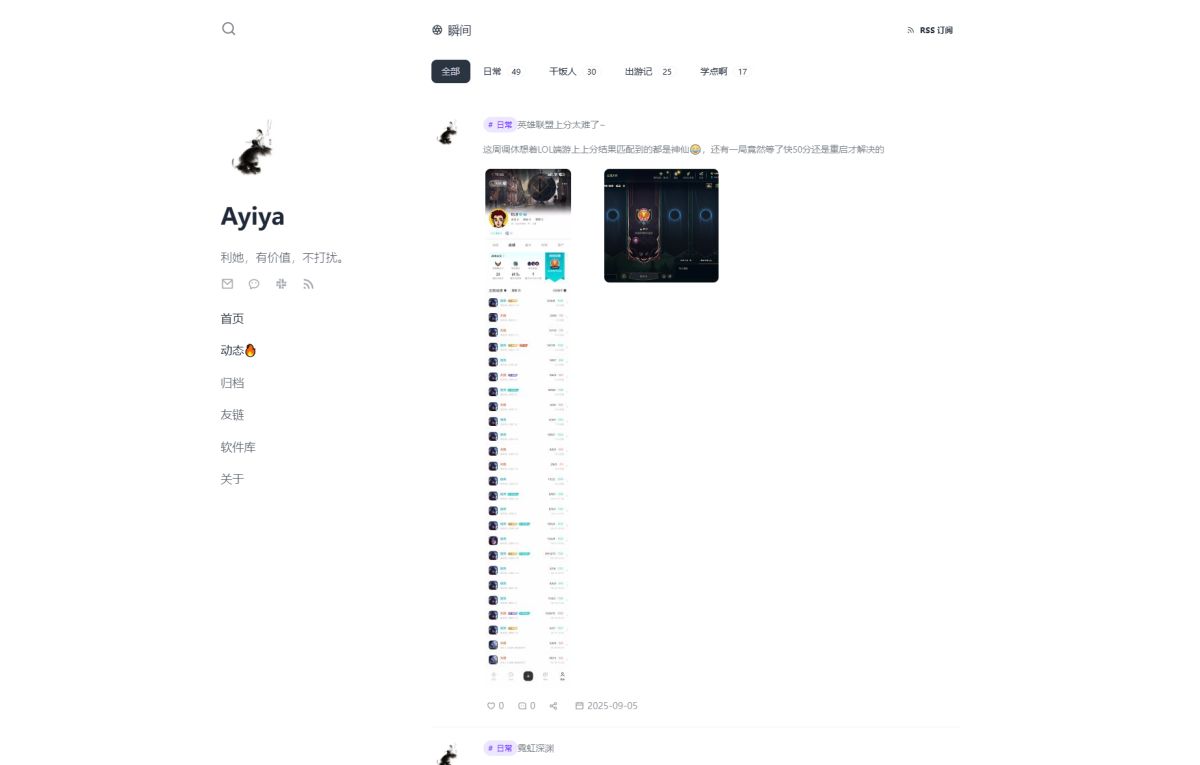
<!-- 解决瞬间发长图会溢出的问题 -->
<style>
.moment-media-item > img {
  width: 100%;
}
</style>
由
https://ryanc.cc/ 提供的解决方案
添加 Meilisearch 搜索
我是用1panel面板一件部署的很方便其他部署方法可参考官方文档:
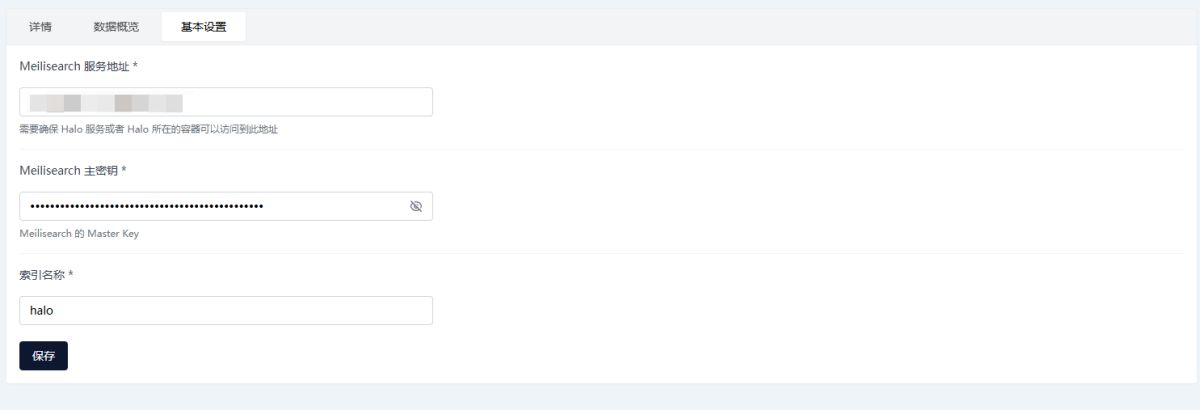
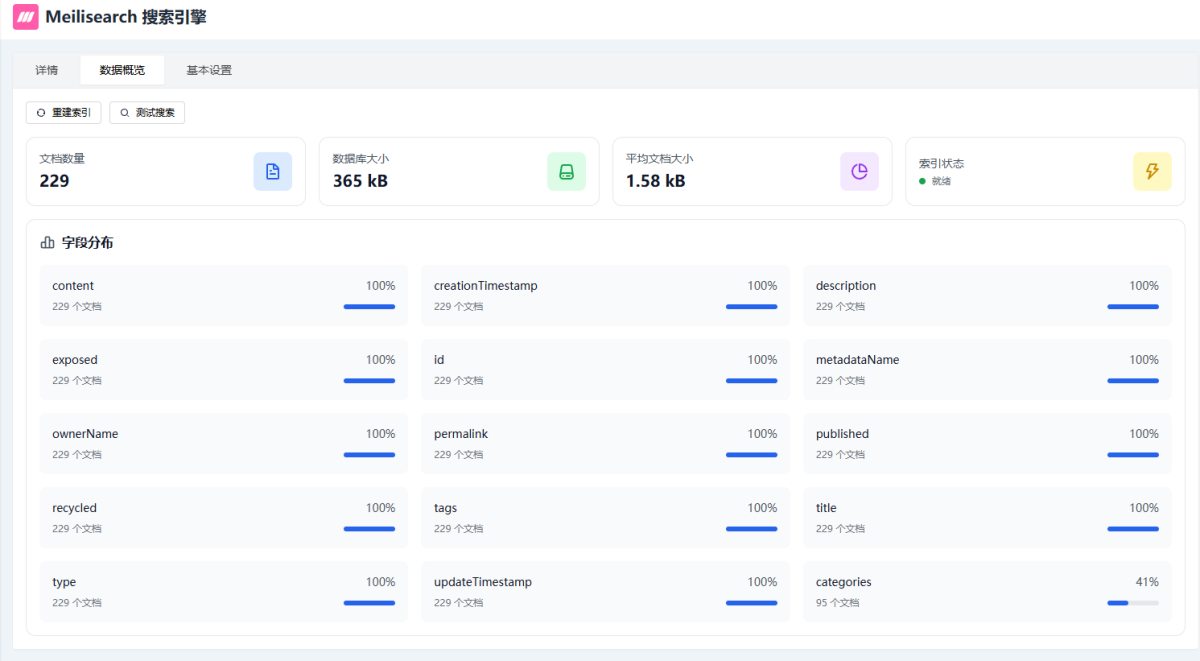
亲测还是很强大的,比默认的强了很多,而且设置起来也很简单只需要部署后添加 Meilisearch的服务地址 和 主密钥 ,然后跳转到数据概览 点击 重建索引 就完成了,很方便
Ps: Meilisearch 插件仅是提供搜索服务,不会提供 UI,所以原来的
https://www.halo.run/store/apps/app-DlacW 不要删
内容引用
本文部分代码片段和方法是在下述文章基础上调整的